Open the DCR Browser using the search panel. How to do this
Select View > Search Panel or click the Open Search Panel icon
 to open the search panel. General help on using the search
panel
to open the search panel. General help on using the search
panelWhen you open the search panel, it will appear as it was when the panel was last closed.
At any time you can clear all the search fields by clicking the Clear Search fields icon
 at the top of the panel.
To save a search for future use, click the Save Search icon
 at the top
of the panel to save the current combination of search
settings. Enter a name for the new search or
click Replace Search and select a search to overwrite.
Click Save. Searches are stored separately for each
user. To open a
previously stored search, click the arrow to the right
of the Open Stored Search icon
at the top
of the panel to save the current combination of search
settings. Enter a name for the new search or
click Replace Search and select a search to overwrite.
Click Save. Searches are stored separately for each
user. To open a
previously stored search, click the arrow to the right
of the Open Stored Search icon  at the top of the panel and select a search from the
drop down list.
at the top of the panel and select a search from the
drop down list.
Select DCR from the Data drop down list.
Select your search criteria. Help on each field within the search panel
General
Study
If you are permitted access to data from more than one study, you may choose to view data from all studies, or from a particular study only. Select your choice from the drop down list.
Site
If you are permitted access to data from more than one site, you may choose to view data from all sites, or from a particular site only. Select your choice from the drop down list.
Subject
You may choose to view data entered for a particular subject only, by entering the subject label (part or whole), or the subject ID. The subject list will open, containing only those subjects who fit your search criteria.
Study Level
Visit
You may choose to view data from all visits, or from a particular visit only. Select your choice from the drop down list.
eForm
You may choose to view data from all eForms, or from a particular eForm only. Select your choice from the drop down list.
Question
You may choose to view data from all questions, or from a particular question only. Select your choice from the drop down list.
User
User
You may choose to view data entered by all users, or by a particular user only. Select your choice from the drop down list.
Date Range
Search
You can search for data before or after a certain date, during a certain period or with no date restrictions. Select your choice from the drop down list.
From
Enter the date from which you want to search by clicking the arrow and selecting the date form the popup calendar.
To
Enter the date to which you want to search by clicking the arrow and selecting the date form the popup calendar.
DCR
Select/Clear All
Use this toggle to either check all the status boxes or to clear all checks. Hover over a status icon to see the status label as a tooltip.
status
Click these check boxes to include all DCRs with a particular status or combination of statuses. You can select multiple check boxes.
Batch Print
DCRs printed as Data Clarification Forms are assigned a batch number. Enter a batch number to include all DCRs in that batch.
Uni DCR Id
All DCRs are assigned a unique identification code. If you know the code of the DCR you wish to view, enter it here.
DCR Code
When raising a DCR, the user may have the option of entering a Disc Code. You can search for all DCRs with a particular Disc Code by selecting one from the drop down list.
Print Code
When printing a Data Clarification Form for a DCR, the user may have the option of selecting a Print Code. You can search for all DCRs with a particular Print Code by selecting one from the drop down list.
Resp Code
Not used in this version.
Click the Execute search button
 to
display the data in the DCR Browser in the main window. What to do if you are told your
search exceeds the maximum number of records
to
display the data in the DCR Browser in the main window. What to do if you are told your
search exceeds the maximum number of recordsYou will be alerted if your search results exceed the maximum number of records allowed in a browser report. If this happens the DCR browser will not open until you change your search criteria to reduce the number of DCRs in the results.
Once the report is open in the browser, the number of records displayed is shown at the bottom of the browser.
To change the maximum records limit, go to Tools > Options.../Administrator Options...
You can change the way in which information is grouped and displayed in the browser. How to do this...
Select File > Print
DCR > DCR List or click the Print icon located under the toolbar
at the top of the screen and select DCR List from the drop down menu.
The report is displayed in the Print Preview
window. See image
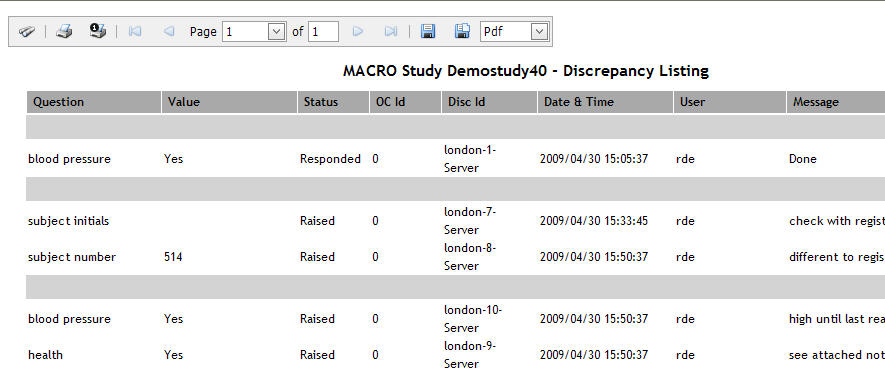
Click the Print Report icon located above the report to display the standard Print window. See image

Specify your print settings and click Print.