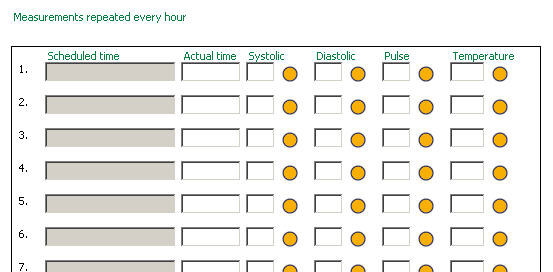
A question group (or 'repeating question group') is a linked group of questions within an eForm. In many ways, a question group behaves like a mini eForm within the larger eForm, with special properties. The individual questions within a question group are laid out in a row. Once the first row of questions has been answered, a new identical row is automatically crated underneath the first.
For example, you could define a group of questions relating to name, age and sex of all family members, which could be repeated 10 times or an unrestricted number times. The questions would appear within a distinctive box, which would scroll to allow more data to be added if necessary. See image
You can define the appearance and properties of question groups, duplicate them and move them around as you design your eForm, in similar ways to ordinary, single questions.
you cannot resize question groups on the eForm
if a question group has more fields than will fit on the screen, a horizontal scroll bar appears
if a horizontal scroll bar appears, the group is sized to show complete fields, wherever possible
The question group visible on the eForm is in the main row. It is possible to create a sub row containing further questions which are displayed in a popup window. This sub row is accessed by clicking a 'Full row' link. Specify which questions you want to appear in the main and sub row in the Question Attributes section of the eForm Definition window. Specify the appearance of both types of row in the eForm Group definition window.
A new row within a question group will be automatically created (up to the Max Repeats set in the eForm Group Definition window) when the current row is complete.
A group row is complete if it contains no mandatory questions with a status of Missing. This means that by setting certain group questions to be Mandatory in the eForm Definition window, you can determine how many fields must be filled in before a new row is created.
A group row is incomplete if it contains at least one non-derived non-empty response value and at least one mandatory question with a status of Missing. A group row with derived questions will not be considered incomplete if the user has not entered any data.
A question group is complete if the minimum number of rows is complete, and there are no incomplete rows. This means that half-filled rows will prevent the group from being complete even if the minimum number of rows has been filled in.
During data entry, a new group row is automatically generated (up to the maximum number of repeats specified for the group) as soon as all the current rows are complete.
If the last row of a group has no data entered, and its row number is higher than the minimum number of repeats, the responses in that row will not be saved.
Click here for our recommendations on the number of questions to use in a single row and other tips on maximising performance.