Security Reports
The following standard reports are provided in the Reports folder within the MACRO application folder. Some of the reports in this list are marked as sub reports and should only be accessed via the relevant main report. Do not add links directly to sub reports on your home page as the data displayed may not be accurate.
Security Reports|
Report Name |
Report Filename |
Description |
|
Security Functions |
Functions.aspx |
Lists all functions carried out in each module in the currently open database.
|
|
Users |
Users.aspx |
Lists all users in the currently open security database. For each user, the full user name, status (enabled or disabled), first login and last login are displayed. Contains links to User Login Activity, Failed Login Attempts and User Roles reports.
|
|
User Login Activity |
UserLogin.aspx |
Lists all successful logins from earliest to most recent. For each login, the date/time, user, location and activity are displayed.
|
|
Failed Login Attempts |
UserLogin.aspx?failed=1 |
Lists all failed logins from earliest to most recent. For each login, the date/time, user, location and activity (reason for failure) are displayed.
|
|
User Roles |
UserRole.aspx |
Lists all users along with their user role and the studies and sites with which they are associated.
|
Metadata Reports|
Report Name |
Report Filename |
Description |
|
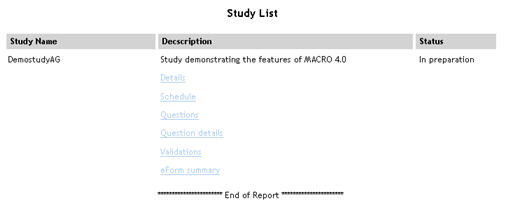
Study List |
StudyList.aspx |
Lists all studies in alphabetical order. For each study, the study description and status are displayed. Contains links to Study Details, Study Schedule, Study Questions, Study Question Details, Study Validations and eForm Summary reports.
|
|
Study Details (Sub report accessed from Study List report) |
StudyDetails.aspx |
Lists details of study taken from the study definition.
|
|
Study Schedule (Sub report accessed from Study List report) |
StudySchedule.aspx |
Lists each eForm in the study with eForm code, repeat status and whether the eForm is used in a special way such as a visit eForm.
|
|
Study Questions (Sub report accessed from Study List report) |
StudyQuestions.aspx |
Lists each question in the study with question name and any special attributes such as whether it is derived.
|
|
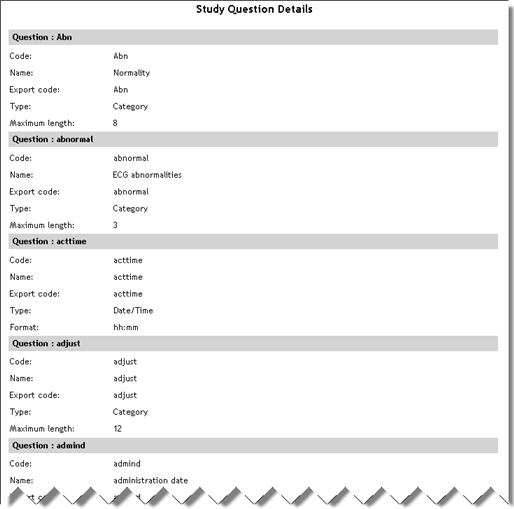
Study Question Details (Sub report accessed from Study List report) |
StudyQuestionDetails.aspx |
Lists each question in the study with code, name, export code, type and maximum length.
|
|
Study Validations (Sub report accessed from Study List report) |
StudyValidation.aspx |
Lists each question in the study that has a validation attached along with validation ID, type, expression and message.
|
Data Reports|
SDVDETAILS.ASPXReport Name |
Report Filename |
Description |
|
eForm Summary (Sub report accessed from Study List report) |
EformSummary.aspx |
Displays a count of eForms being used in the study across different visits planned as per visit plan. Data is grouped by study. |
|
Missing Data - Study Summary |
MissingData.aspx |
For each study, the number of missing values, total number of values and % missing is displayed.
|
|
Missing Data - Site Summary |
MissingDataSite.aspx |
For each study, a list of sites is displayed. For each site, the number of missing values, total number of values and % missing is displayed.
|
|
Missing Data - Subject Summary |
MissingDataSubject.aspx |
For each study, a list of subjects is displayed. For each subject, the site, number of missing values, total number of values and % missing is displayed.
|
|
Missing Data - eForm Summary |
MissingDataEform.aspx |
For each study/site/subject, a list of eForms is displayed. For each eForm, the number of missing values is displayed.
|
|
Data Values Changed |
ChangedDataValues.aspx |
Displays responses to questions in the specified study that have been changed more than the specified number of times and have multiple entries in the audit trail.
|
|
Adverse Events |
AdverseEvents.aspx |
Displays details of adverse events. This report requires the following questions to exist in the study definition:
|
|
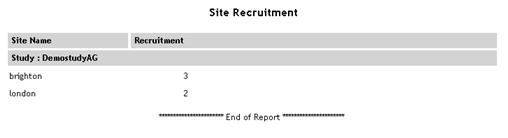
Site Recruitment |
SiteRecruitment.aspx |
Displays the recruitment numbers for the specified study/country/site.
|
|
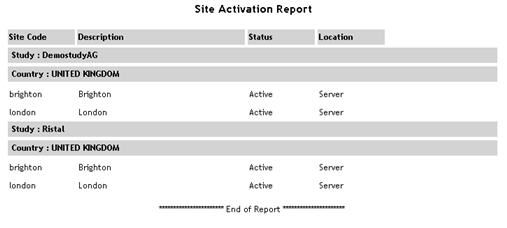
Site Activation |
SiteActivation.aspx |
Displays the current status (active or inactive) of all sites within the specified study/country.
|
|
SDV Summary |
SDVSummary.aspx |
Lists all the data items (subject, visit, eForm and questions) and their SDV status and status date for the specified study/country/site.
|
|
SDV Details |
SdvDetails.aspx |
Lists all questions with SDVs attached, displaying the number of SDVs of each status for each question.
|
|
DCR Summary |
DcrSummary.aspx |
Lists the number of DCRs of each status for the specified study/country/site.
|
|
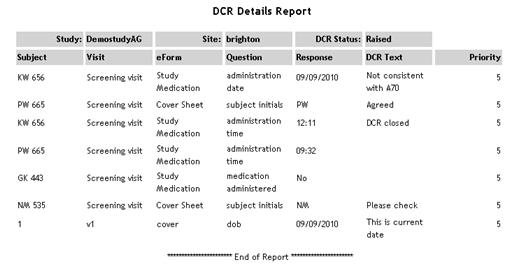
DCR Details |
DcrDetails.aspx |
Lists all DCRs in each study, showing subject/visit/eForm/question, response value, DCR text and priority.
|
|
Subject Details |
SubjectDetails.aspx |
Displays ID, initials, sex and DOB for each subject in the specified study/country/site along with the status for each visit in the schedule. This report requires the following questions to exist in the study definition:
|
|
Subject Data (Sub report accessed from Subject Details report) |
SubjectData.aspx |
Displays the status of each visit/eForm/question in the specified study/country/site.
|
Linking to the report from the home page
In order for standard reports to be accessed from the home page, you must add the new report as a home page report item, link it to a home page group and assign user permissions. Help on this...
It is also possible to create customised reports.
Creating home page links to reports and files