When validation
is run
When validation
is run
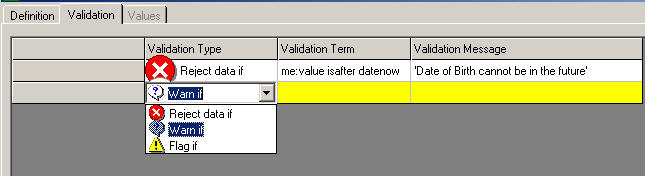
A question's validation conditions specify the rules and conditions that the value of this question must satisfy. For example, you may want to specify that a value must be between 100 and 300, or that a date value must be before a date value on another eForm. When you specify a validation condition, you also specify a message that will be displayed to the user if they enter a value which satisfies that condition.
If a question has several different validation conditions they will be tested in the order that they appear in the Question Definition window. All conditions that are true will be dislayed to the user but only the first can be overruled and stored with the response in the database.
Note: You cannot define validations for lab test questions, because they are validated against laboratory normal range information.
Note: You should not add or change 'Reject if' validation conditions once the study has been opened for subject data entry.
The Arezzo Terms report in the Study Data Diagnostic Utility module can be used to list all existing validation conditions in a study definition.
When validation
is run
Levels
of validation Creating
a set of validation conditions Deleting
a validation condition
Validation
messages
 Reject if...
 Warn if...
 will
be displayed
will
be displayed is displayed
 Flag if...
 and the validation message. Users without this permission
will be unaware of the condition.
and the validation message. Users without this permission
will be unaware of the condition.