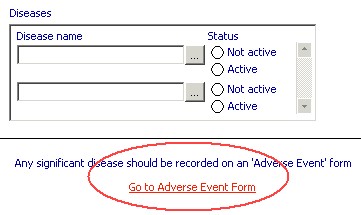
A hotlink appears as a label on an eForm, and allows the Data Entry user to go directly to another specified eForm. See image
You can specify a caption and a target eForm for the link. A Data Entry user can then go directly to the specified eForm by clicking on the hotlink. Once you have inserted a hotlink, you can move it around the eForm, edit its definition and change its appearance.
 Inserting
a Hotlink Editing
a Hotlink definition Moving
a Hotlink Deleting
a Hotlink Editing
the font, size and colour of a Hotlink Hotlink
behaviour in Data Entry
Inserting
a Hotlink Editing
a Hotlink definition Moving
a Hotlink Deleting
a Hotlink Editing
the font, size and colour of a Hotlink Hotlink
behaviour in Data Entry