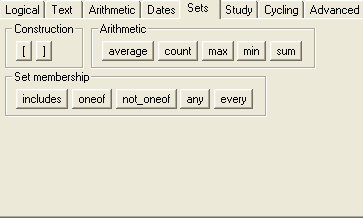
If your study includes repeating question groups or repeating visits and eForms, you can use Arezzo set functions on groups of responses. You can see the set function buttons on the Sets tab in the Expression Builder. See image
Here’s how you specify a set in Arezzo.
You can create an explicit set using square brackets and listing the members of the set, separated by commas. For example,
[ nausea, headache, fatigue ]
is a set of three elements,
[ 12, 34, 78, 99 ]
is a set of four numbers, and
[ YN_1, YN_2, YN_3 ]
is a set of three question values. Note that in this last case, if you use this set in a condition, the condition will only be true if all the question values are known.
If a question is within a repeating question group, the question code represents the set of all the responses within the group. For example, if MedName is a question in a repeating group, the expression
count( MedName )
returns the number of values for MedName that have been filled in.
If you want to use this expression in a different eForm, you must specify the visit and eForm too, for example:
count( Treatment:ConMeds:MedName )
If either the visit or the eForm is repeating, this represents the set of all responses to MedName in all the cycles of the ConMeds eForm in all the cycles of the Treatment visit.
You can restrict the visit or the eForm by specifying particular cycles, e.g.
count( Treatment(first):ConMeds(last):MedName )
For questions on repeating eForms, the eForm and question specification represents the set of all the responses on all the eForms. For example, if AEDescription is a question on a repeating AEvent eForm, the expression
count( Treatment:AEvent:AEDescription )
returns the number of AEDescription responses on all the AEvent eForms in the Treatment visit.
For questions on eForms in repeating visits, the visit, eForm and question specification represents the set of all the responses on all the eForms in all the visits. For example, if AEDescription is a question on a (possibly repeating) AEvent eForm in a repeating Treatment visit, the expression
count( Treatment:AEvent:AEDescription )
returns the number of AEDescription responses on all the AEvent eForms in all the Treatment visits.
You can use the underscore character _ to specify 'any eForm' or 'any visit'. For example, the expression
count( _:_:AEDescription )
returns the total number of AEDescription responses on all eForms in all visits in the study. The expression
count( _:AEvent:AEDescription )
returns the total number of AEDescription responses on all Aevent eForms in all visits in the study.
The available set functions are as follows:
|
count |
How many items are in the specified set. For question responses, this is how many questions have non-empty response values. |
|
average |
Only applicable to sets of numbers. The arithmetic mean of the set of numbers. |
|
sum |
Only applicable to sets of numbers. The sum of the set of numbers. |
|
min |
Only applicable to sets of numbers and dates. The minimum value or earliest date in the set. |
|
max |
Only applicable to sets of numbers and dates. The maximum value or latest date in the set. |
Click here for an example of using the arithmetic set functions in a repeating question group.
See the Set Operators topic for a description of set membership operators.